 简体中文
 English

Why Is Your Inverter LCD Display Not Working? Common Faults and Fixes
An inverter LCD display is the human-machine interface built into the front panel of an inverter or an all-in-one inverter charger. It shows input voltage, output voltage, load power, battery level, and fault codes, and it is widely used in RV power systems, off-grid solar installations, and vehicle power setups. The display does not directly affect power output, but it is the main window through which users judge the operating status of the unit. When the screen goes dark, shows garbled characters, flickers, or reports abnormal readings, a minor issue can be mistaken for a serious failure. This article sorts out five common display faults, their causes, and the steps to diagnose them.
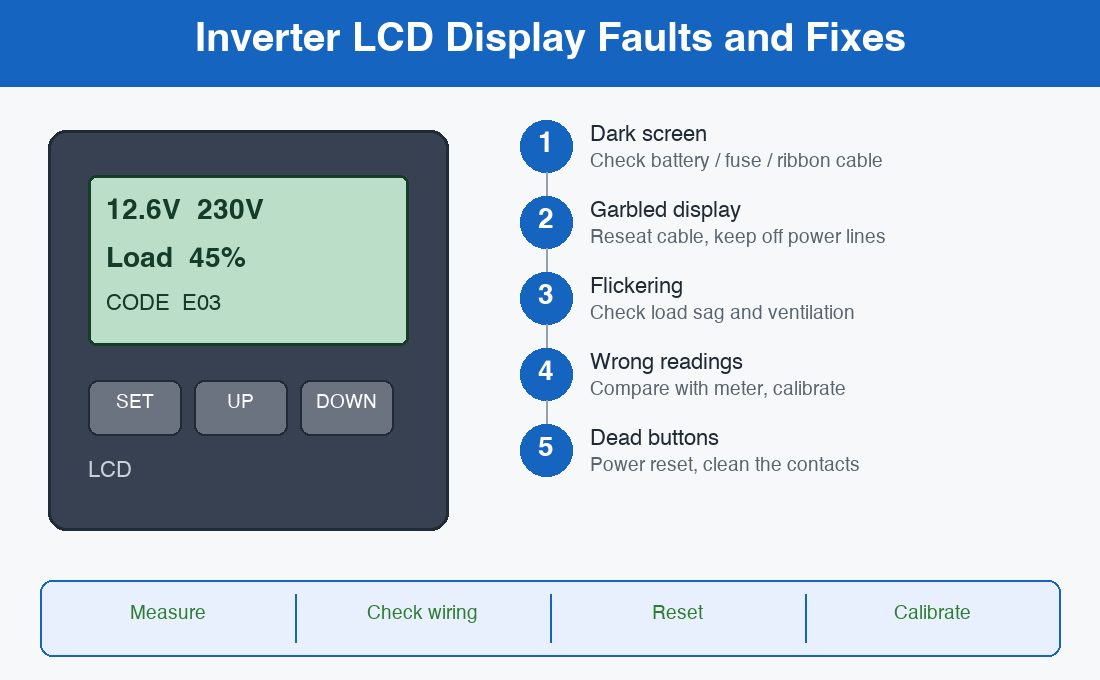
1. The Display Does Not Light Up at All
A completely dark screen is one of the more frequently reported issues, but in most cases the screen itself is not broken; the unit simply has no proper power supply. The LCD is driven by an auxiliary power circuit inside the inverter. When battery voltage drops below the undervoltage threshold (about 10.5V on a 12V system and about 21V on a 24V system), the whole unit shuts down and the screen goes dark with it.
The recommended diagnostic order is: measure the actual battery voltage with a multimeter to rule out a drained battery; check whether the input terminals are loose, whether a fuse has blown, and whether the polarity is reversed. Only after all of these check out should you suspect a loose display ribbon cable or a backlight circuit fault, which requires opening the unit or returning it for service.
2. Garbled Characters or a Corrupted Screen
Garbled or corrupted display output usually points to three causes. First, poor contact of the ribbon cable; vibration during transport or long-term driving (common in RV and marine use) can loosen the connector. Second, electromagnetic interference; if the display signal cable runs close to high-current wiring, the screen can corrupt under load. Third, a firmware glitch in the main controller, which can occasionally corrupt the display buffer.
The fix is straightforward: power the unit off, wait 30 seconds, and restart it. If the problem keeps coming back, reseat the ribbon cable and reroute the wiring so signal cables stay away from high-current loops.
3. Flickering or Intermittent Shutdown of the Screen
If the screen dims or flickers the moment a load is connected, the cause is usually a brief drop in bus voltage. When a high-power load such as a kettle or microwave starts, battery internal resistance pulls the input voltage down for an instant, the auxiliary supply becomes unstable, and screen brightness fluctuates. If flickering comes together with frequent fan starts and stops, also check the ambient temperature and make sure the air vents are not blocked. In cold conditions below 0°C, liquid crystal response slows noticeably; sluggish digits are a normal material property and recover once the unit warms up.
4. Abnormal Readings: Inaccurate Voltage or Power
The voltage and power figures on screen are calculated by a sampling circuit and a metering chip. After long periods of high-temperature operation, sampling resistors can drift, causing displayed values to deviate from actual ones. In addition, with inductive or capacitive loads the power factor is below 1, and some models display apparent power rather than real power, so the number looks higher than expected. The practical check is to compare the displayed output voltage with a multimeter reading: a deviation within ±5% is normal; beyond that, calibration or repair is needed. A pure sine wave inverter holds a steadier output voltage, so the multimeter comparison is also closer to the true RMS value.
5. Unresponsive Buttons and a Frozen Interface
Panel buttons are usually membrane switches. After long exposure to humid or dusty environments, their contacts can oxidize, so a button may stop responding or require firm pressure. A frozen interface is usually an occasional firmware issue. The remedy is to power off for more than 30 seconds so the controller resets completely. Unresponsive buttons can be cleaned around the panel gaps with isopropyl alcohol; if they still fail, the membrane needs replacement. In an off-grid solar system, the inverter often works alongside an MPPT solar charge controller, so during diagnosis make sure you know which device generated the fault message instead of mixing them up.
6. Fault Symptoms and Diagnostic Reference Table
| Symptom | Likely cause | Diagnosis and fix |
|---|---|---|
| Screen completely dark | Low battery, blown fuse, loose ribbon cable | Measure battery voltage, check fuse and terminals, then the ribbon cable |
| Garbled or corrupted display | Poor ribbon contact, EMI, firmware glitch | Power cycle, reseat the ribbon cable, reroute wiring |
| Flickering or intermittent blackout | Voltage sag under load, poor cooling, low temperature | Check the load, clean the vents, observe after warming up |
| Readings off by a large margin | Sampling drift, power factor effect | Compare with a multimeter; calibrate if beyond ±5% |
| Dead buttons or frozen UI | Oxidized contacts, firmware hang | Full power reset, clean buttons, replace membrane if needed |
Frequently Asked Questions
Q: The inverter still outputs power but the screen is dark. Is the screen broken?
A: Not necessarily. If the unit still delivers power, the main power stage is fine, and the problem is more likely in the display ribbon cable, the backlight driver, or the auxiliary supply branch. Power cycle the unit and reseat the ribbon cable first; replace the display assembly only if the screen stays dark.
Q: Can users look up fault codes on the screen by themselves?
A: Yes. Fault codes are defined by the manufacturer, and the manual or the official website provides the reference table. Common codes correspond to undervoltage, overvoltage, overload, and overtemperature protection. Note the code, check the related input voltage and load, and in most cases the protection clears automatically once the abnormal condition is removed.
Q: Does a sluggish screen in cold weather need repair?
A: No. The response speed of a liquid crystal panel slows as temperature drops; this is a physical property of the material and is more obvious below 0°C. The display returns to normal once the unit warms up, so no repair is needed.
If the problem persists after the steps above, contact the manufacturer's technical support. LECOOVO operates a 4000-square-meter production base in Zhongshan, covering products from 300W to 6000W with CE, UL, SAA, and CCC certifications, and supports OEM/ODM customization. Feel free to contact us for product selection and after-sales support.
 How to Wire Solar Panels Facing Different Directions
 How Long Does a DC-to-DC Charger Take to Charge an Auxiliary
 How Do You Size a Winter Battery Bank for an Off-Grid System
 Can an Inverter Run a Refrigerator? Starting Power and Runti